Academic Branch Website Migration Plan
Academic Branch Website Migration Plan
Goal
Move the public website from the current main branch static HTML site to the academic branch Jekyll Academic Pages site.
Use main only as the source for personal content and assets. Keep the Academic Pages structure on academic instead of copying the old index.html, publication.html, others.html, or style.css directly into the new site.
Current local state:
- Target branch:
academic - Current published-content source:
origin/main - Old site type: static HTML/CSS
- New site type: Jekyll Academic Pages
Recommended Workflow
1. Create a Safety Branch
Work on a temporary migration branch first. This keeps academic clean until the migrated site has been checked locally.
git checkout academic
git pull origin academic
git status
git checkout -b academic-content-migration
If anything unexpected appears in git status, stop and decide whether those changes should be committed, stashed, or left alone before continuing.
2. Install and Run the Local Preview
Academic Pages is a Jekyll site, so local preview needs Ruby, Bundler, Node, and build tools.
sudo apt install ruby-dev ruby-bundler nodejs build-essential gcc make
bundle install
bundle exec jekyll serve -l -H localhost
Preview URL:
http://localhost:4000
Restart the Jekyll server whenever _config.yml changes.
2A. If Ruby Cannot Be Installed Locally
Local Ruby is useful but not required. GitHub Pages can build the Jekyll site remotely after the changes are pushed.
Use this no-admin workflow when local installation is not possible:
- Do all content migration work on
academic-content-migration. - Commit and push the branch.
- Let GitHub Actions or GitHub Pages perform the Jekyll build remotely.
- Fix any build errors reported by GitHub.
- Merge into
academiconly after the remote build is clean. - Switch GitHub Pages from
maintoacademicwhen ready.
No-admin validation options, from safest to simplest:
- GitHub Actions build check: add a workflow that runs
bundle installandbundle exec jekyll buildon GitHub. This validates the site without requiring Ruby locally. - GitHub Codespaces: open the repository in a Codespace and run the Jekyll preview there. Codespaces provides a cloud development environment where installing Ruby dependencies does not require administrator access on the local machine.
- GitHub Pages branch deployment: push the completed
academicbranch and use GitHub Pages to build it. This is enough for deployment, but preview happens only after switching the Pages source. - Temporary staging repository: push the migrated
academicbranch to a separate GitHub Pages repository first, verify the rendered site there, then apply the same changes to the real repository.
Recommended no-admin build-check workflow:
name: Jekyll build check

on:
  pull_request:
  push:
    branches:
      - academic
      - academic-content-migration

jobs:
  build:
    runs-on: ubuntu-latest
    steps:
      - uses: actions/checkout@v4
      - uses: ruby/setup-ruby@v1
        with:
          ruby-version: '3.2'
          bundler-cache: true
      - run: bundle exec jekyll build
Save it as:
.github/workflows/jekyll-build-check.yml
This workflow does not deploy the site. It only checks whether the Jekyll build succeeds.
3. Inventory Personal Content from main
Use origin/main as the source of truth for current personal details.
git ls-tree -r --name-only origin/main
git show origin/main:index.html > /tmp/main-index.html
git show origin/main:publication.html > /tmp/main-publication.html
git show origin/main:others.html > /tmp/main-others.html
Main content sources:
index.html: About Me, Recent News, Professional Activities, Contactpublication.html: publication list, paper links, project links, paper figuresothers.html: Teaching, Experience, PhD Supervision, Visiting Students, Awards and GrantsCV/CV_YangZHAO_2021.pdf: current CV PDFprofile_Yang.png,Yang_profile.jpg,scholar.jpg,github.png,linkedin.png,orcid.png,latrobe.png: profile and icon assetspaperFig/*: publication figure assets
4. Copy Assets into Academic Pages Locations
Recommended destination layout:
images/profile_Yang.png
images/Yang_profile.jpg
images/icons/scholar.jpg
images/icons/github.png
images/icons/linkedin.png
images/icons/orcid.png
images/icons/latrobe.png
images/paperFig/*
files/CV_YangZHAO_2021.pdf
Example copy workflow:
git restore --source origin/main -- CV profile_Yang.png Yang_profile.jpg scholar.jpg github.png linkedin.png orcid.png latrobe.png paperFig
mkdir -p images/icons images/paperFig files
mv profile_Yang.png images/profile_Yang.png
mv Yang_profile.jpg images/Yang_profile.jpg
mv scholar.jpg github.png linkedin.png orcid.png latrobe.png images/icons/
mv paperFig/* images/paperFig/
mv CV/CV_YangZHAO_2021.pdf files/CV_YangZHAO_2021.pdf
rmdir paperFig CV
After moving assets, update links in Markdown and HTML to use paths like:
/images/profile_Yang.png
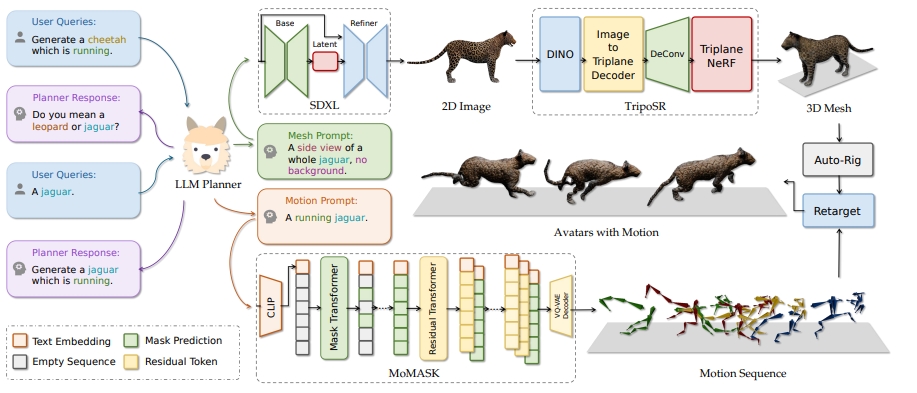
/images/paperFig/MotionAvatar.png
/files/CV_YangZHAO_2021.pdf
Keep file name case exactly the same, for example ATP.PNG is different from ATP.png on GitHub Pages.
5. Update Site Configuration
Edit _config.yml.
Replace the template values with personal and repository values:
title: "Yang Zhao"
name: &name "Yang Zhao"
description: &description "Computer vision and machine learning researcher"
url: "https://yangyangkiki.github.io"
baseurl: ""
repository: "yangyangkiki/yangyangkiki.github.io"

author:
  avatar: "profile_Yang.png"
  name: "Yang Zhao"
  bio: "Lecturer (Assistant Professor), La Trobe University"
  location: "Bundoora VIC, Australia"
  employer: "La Trobe University"
  email: "y.zhao2@latrobe.edu.au"
  googlescholar: "https://scholar.google.com/citations?user=UrVEK7IAAAAJ&hl=en&oi=sra"
  orcid: "https://orcid.org/0000-0001-5252-658X"
  github: "yangyangkiki"
  linkedin: "kiki-yang-zhao"
Also check:
future: truecan show future-dated sample posts. Remove sample posts or set this intentionally.analytics.providercan stay disabled unless analytics should be migrated.talkmap_linkshould stayfalseunless talk locations are added.
6. Simplify Navigation
Edit _data/navigation.yml.
Start with a small navigation that matches the current old site:
main:
  - title: "Publications"
    url: /publications/

  - title: "Teaching"
    url: /teaching/

  - title: "CV"
    url: /cv/
Optional later additions:
- Add
Talksonly after real talk entries are migrated. - Add
Blog Postsonly if real posts exist. - Add
Portfolioonly if it will be maintained. - Do not keep the template
Guidelink on the public site.
7. Migrate Home Page Content
Edit _pages/about.md.
Keep this front matter:
---
permalink: /
title: "Yang Zhao"
author_profile: true
redirect_from:
  - /about/
  - /about.html
---
Replace the template body with content from origin/main:index.html:
- About Me
- Recent News
- Professional Activities
- Contact
Use Markdown headings and lists instead of the old table-based HTML where possible.
Suggested page structure:
## About Me

I am a Lecturer (Assistant Professor) at the Department of Computer Science and Information Technology, La Trobe University...

## Recent News

- [Jan 2026] One paper "VaseVQA-3D: Benchmarking 3D VLMs on Ancient Greek Pottery" has been accepted to ICLR 2026.
- [Jan 2026] One paper "VaseVQA: Multimodal Agent and Benchmark for Ancient Greek Pottery" has been accepted to EACL 2026.

## Professional Activities

- Journal Reviewer: IEEE Transactions on Multimedia, Pattern Recognition, IEEE Journal of Biomedical and Health Informatics...
- Conference Reviewer: Co-organizer of AIiH2024 Special Session, PC member of CASA 2024...

## Contact

- Email: y.zhao2@latrobe.edu.au
- Address: Office 319, PS2 Building, La Trobe University, Bundoora VIC 3083, Australia
8. Migrate Publications
Recommended long-term approach: convert each publication from origin/main:publication.html into one Markdown file under _publications/.
Example file:
_publications/2024-07-01-motion-avatar.md
Example front matter:
---
title: "Motion Avatar: Generate Human and Animal Avatars with Arbitrary Motion"
collection: publications
category: conferences
permalink: /publication/2024-motion-avatar
date: 2024-07-01
venue: "The 35th British Machine Vision Conference (BMVC 2024)"
paperurl: "https://arxiv.org/abs/2405.11286"
citation: "Zeyu Zhang*, Yiran Wang*, Biao Wu*, Shuo Chen, Zhiyuan Zhang, Shiya Huang, Wenbo Zhang, Meng Fang, Ling Chen, and Yang Zhao. Motion Avatar: Generate Human and Animal Avatars with Arbitrary Motion. BMVC 2024."
---
[Demo](https://steve-zeyu-zhang.github.io/MotionAvatar/)
Publication migration rules:
- Use
category: conferencesfor conference papers. - Use
category: manuscriptsfor journal articles. - Use one stable permalink per paper.
- Remove the sample
_publications/*paper-title-number*files after real publications are added. - Keep old paper figure assets under
/images/paperFig/.
Fast temporary approach: paste a cleaned Markdown or HTML version of the old publication table into _pages/publications.md. This is quicker, but it gives up the Academic Pages collection features.
9. Migrate Other Page Content
Content from origin/main:others.html should be split into Academic Pages pages.
Recommended mapping:
- Teaching list:
_pages/teaching.md - Experience:
_pages/cv.mdor a new_pages/experience.md - PhD Supervision:
_pages/teaching.mdor a new_pages/supervision.md - Visiting Students / Research Interns / Research Assistants:
_pages/teaching.mdor_pages/supervision.md - Awards and Grants:
_pages/cv.md
If one page is preferred, create _pages/others.md:
---
layout: single
title: "Others"
permalink: /others/
author_profile: true
---
Then add this to _data/navigation.yml:
  - title: "Others"
    url: /others/
10. Remove Template Sample Content
After real content is migrated, remove or replace template files that should not appear publicly.
Likely removals:
_posts/2012-08-14-blog-post-1.md
_posts/2013-08-14-blog-post-2.md
_posts/2014-08-14-blog-post-3.md
_posts/2015-08-14-blog-post-4.md
_posts/2199-01-01-future-post.md
_portfolio/portfolio-1.md
_portfolio/portfolio-2.html
_talks/2012-03-01-talk-1.md
_talks/2013-03-01-tutorial-1.md
_talks/2014-02-01-talk-2.md
_talks/2014-03-01-talk-3.md
_teaching/2014-spring-teaching-1.md
_teaching/2015-spring-teaching-2.md
Also search for template leftovers:
grep -R "Your Name\\|academicpages\\|Red Brick University\\|john+snow" _config.yml _pages _publications _posts _talks _teaching
11. Build and Verify Locally
If Ruby is available locally, run:
bundle exec jekyll build
bundle exec jekyll serve -l -H localhost
Check these URLs:
http://localhost:4000/
http://localhost:4000/publications/
http://localhost:4000/teaching/
http://localhost:4000/cv/
http://localhost:4000/files/CV_YangZHAO_2021.pdf
Verify:
- Homepage shows Yang Zhao content, not template text.
- Sidebar shows the correct profile image and links.
- Publications show real papers.
- Paper figures load.
- No old static pages are required for navigation.
- No sample posts, talks, portfolio items, or guide pages are visible in navigation.
- The build completes without Liquid or Sass errors.
If Ruby is not available locally, use the GitHub Actions build check from Step 2A instead. The remote build should pass before switching GitHub Pages deployment to academic.
12. Commit the Migration
Commit after local preview is acceptable, or after the remote GitHub Actions build check passes if local preview is not available.
git status
git add _config.yml _data/navigation.yml _pages _publications _posts _talks _teaching images files
git add ACADEMIC_BRANCH_MIGRATION_PLAN.md
git commit -m "Migrate personal site content to Academic Pages"
git push -u origin academic-content-migration
Open a pull request from academic-content-migration into academic, or merge locally:
git checkout academic
git merge --ff-only academic-content-migration
git push origin academic
13. Switch GitHub Pages Deployment
After academic contains the migrated site:
- Open the GitHub repository.
- Go to
Settings>Pages. - Under
Build and deployment, chooseDeploy from a branch. - Select branch
academic. - Select folder
/ (root). - Save.
- Wait for the Pages build to finish.
- Visit
https://yangyangkiki.github.io.
If the repository uses a GitHub Actions Pages workflow instead of branch deployment, update the workflow trigger to build from academic.
14. Rollback Plan
Keep main unchanged until the new site is verified in production.
If the new site has a deployment problem:
- Go to
Settings>Pages. - Switch the source branch back to
main. - Save.
- Confirm
https://yangyangkiki.github.ioshows the old site again.
Do not delete main until the academic site has been live and checked.
Implementation Order
- Configure
_config.yml. - Copy images, icons, CV, and paper figures.
- Replace homepage content in
_pages/about.md. - Simplify
_data/navigation.yml. - Migrate publications.
- Migrate teaching, supervision, experience, and awards.
- Remove template sample content.
- Build and preview locally.
- Commit and push.
- Switch GitHub Pages to
academic.